
Consumable List
Table of Contents
1. Use Cases
Quick links: Track packaging cost and material usage | Confirm the warehouse has your materials ready
Scenario 1: Track packaging cost and material usage
Situation: While calculating the true cost of each order, you realize that beyond shipping fees, packaging materials such as cartons, bubble wrap, and tape are an ongoing expense. You want to know which consumables the warehouse actually uses, along with their cost and dimensions, to inform your product pricing or shipping strategy.
Using this feature: The consumable list gathers every packaging material registered by the warehouse in one place, where you can review each item's dimensions, volume, and current quantity (see List columns). A consumable is a material used to pack your shipments — for example cartons of various sizes, bubble wrap, sealing tape, and cushioning. These are not goods you sell, but supplies consumed during shipping. Each time the warehouse ships using a consumable, the system automatically deducts it from that item's quantity.
Result: You gain a clear view of the materials and specifications the warehouse uses, helping you assess your packaging cost structure, spot cases of "small product in a big box" that waste shipping fees, and discuss switching materials with the warehouse.
Scenario 2: Confirm the warehouse has your materials ready
Situation: You are about to launch a promotion and expect shipping volume to surge, and you plan to switch to a smaller carton for small items to save on shipping. After discussing it with the warehouse, you want to confirm they have registered this new material in the system and that its specifications are correct.
Using this feature: Find the material in the consumable list by name or barcode, then open it to verify the registered length, width, height, and volume match what you agreed on (see Search & filter). Adding consumables and maintaining their specifications is handled by the warehouse; what you see in the admin portal is the result after the warehouse registers them.
Result: You confirm the new material is correctly registered with the right specifications, so the warehouse can use this carton and automatically record usage during the promotion. If a specification is off, you can ask the warehouse to fix it before shipping begins, avoiding inaccurate volume and shipping estimates later.
2. Features
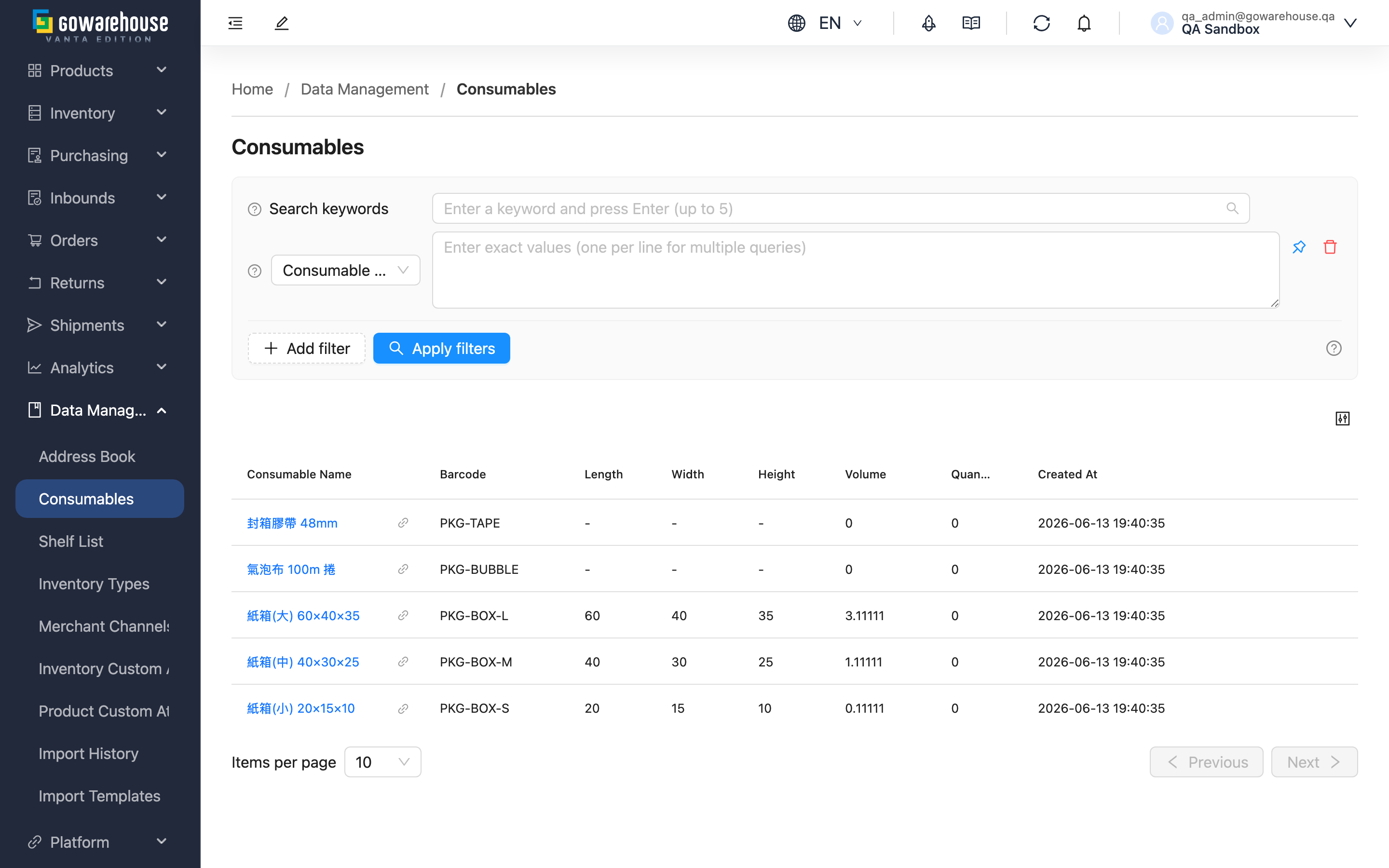
A consumable is a material the warehouse uses to pack your products when shipping (cartons, bubble wrap, tape, cushioning, etc.). The consumable list gives you an overview of every material registered by the warehouse — its specifications, volume, and current quantity — helping you understand your packaging cost structure and material fit. Adding, editing, and deleting consumables is all handled by the warehouse; the admin portal is read-only, so you can view and search but will not see add or edit buttons.
Quick jump: Search & filter | List columns
2.1 Search & Filter
The search box at the top of the page lets you search by consumable name or barcode. The system matches from the beginning of the name and barcode, so typing text from the middle may return no results.
Advanced filtering offers two conditions, "Consumable Name" and "Barcode", both supporting multiple values at once. Other fields can simply be entered by name.
2.2 List Columns
Click a consumable name to open its detail page with full specifications; the link icon next to the name opens the detail page in a new tab.
| Column | Description | Notes |
|---|---|---|
| Consumable Name | Click to open the detail page | Sortable and filterable |
| Barcode | The barcode or internal code the warehouse scans to identify this material | Sortable and filterable |
| Length | In centimeters | Can be left blank for materials with no fixed size |
| Width | In centimeters | Can be left blank for materials with no fixed size |
| Height | In centimeters | Can be left blank for materials with no fixed size |
| Volume | Calculated automatically from length, width, and height; affects shipping estimate accuracy | See FAQ |
| Use as Shipping Volume Basis | Whether this material is the outer carton used for shipping. If so, shipping uses its length, width, and height directly as the parcel's volume | Maintained by the warehouse |
| Quantity | The current stock quantity registered by the warehouse; automatically deducted when used in shipping | Sortable |
| Created At | When this consumable was created in the system | Sortable |
💡 Tip: Click the column settings button at the top right of the list to customize which columns are shown or hidden.
3. FAQ
3.1 FAQ
▪ Why can't I add or edit consumables?
Consumable data is maintained by the warehouse — the warehouse is the one that actually purchases, stores, and uses the materials, and centralized registration keeps the system data consistent with the materials on hand. The admin portal's consumable page is read-only, so there are no add or edit buttons. To add a material or change its specifications, please contact the warehouse.
▪ How is "Volume" calculated? How does it relate to shipping fees?
Volume is converted automatically from length, width, and height, with the unit shown as "cubic meters", "Sai", or "cubic feet" depending on your company's volume unit setting. The calculation is "length × width × height (cm)" divided by the unit's base: 27,000 for Sai (30 × 30 × 30 cm), 28,316.85 for cubic feet, and 1,000,000 for cubic meters. Carriers usually compare "actual weight" against "volumetric weight" and charge by the greater of the two, so accurate dimensions and volume help you estimate shipping fees more precisely.
▪ What does Quantity represent? Does it change automatically?
Quantity is the current stock of this consumable registered by the warehouse in the system. Each time the warehouse ships using this consumable, the system automatically deducts the amount used; if that shipment is later returned or rebuilt, the used amount is automatically restored.
▪ What if a consumable has no fixed size?
For materials with no fixed size (such as tape or cushioning), length, width, and height can be left blank, and the list will show them empty. Without dimensions, volume cannot be calculated, so the volume column will also be empty.
▪ Can a consumable's barcode be the same as a product's barcode?
Yes. Consumables and products are managed separately, so the same barcode causes no conflict.
▪ Why can't I find the consumable I'm looking for?
Search matches from the beginning of the name and barcode, so text from the middle will not match. Use a keyword from the start of the name or barcode; if a filter is applied, also confirm the filter settings are correct.
▪ Can the list be sorted?
Yes. Click the "Consumable Name", "Barcode", "Quantity", or "Created At" column header to sort.
3.2 Notices
⚠️ Important Notes
- This page is read-only; adding, editing, and deleting consumables is always handled by the warehouse
- If a specification or barcode does not match the actual material, contact the warehouse to correct it as early as possible to avoid inaccurate volume and shipping estimates
4. Related Features
| Feature | Description | Link |
|---|---|---|
| Consumable Details | View the full specifications of a single consumable | Go |
| Order List | View order and shipping information | Go |