
Unknown Products
Table of Contents
I. Use Cases
Quick Links: Orders stuck and can't ship | Stop a product becoming unknown again
Scenario 1: Just connected a new platform, and a batch of imported orders is stuck
Situation: You just connected a new store account (Shopee, Momo, etc.). After importing the first batch of orders, some items can't be matched to any product in the system. Those orders are held before picking — the system doesn't know which inventory to deduct, so the whole order is temporarily frozen.
Use this feature: Open the "Unknown Products" list to review every unmatched SKU, then go into each one and map it to the correct product.
Result: Once mapped, the affected orders automatically return to the normal flow and can be allocated, picked, and shipped.
Scenario 2: The same product becomes an unknown product on every import, and you want to fix it for good
Situation: A product's SKU on the e-commerce platform differs from the one registered in your warehouse system, so every order import creates a new Unknown Product that you have to map by hand each time.
Use this feature: When mapping, if the record comes from a platform that supports backfill (currently Shopee), you can backfill your internal SKU to the platform so the platform product's SKU is changed to match the system.
Result: Future orders for the same product match the system product automatically and no longer create Unknown Product.
II. Feature Guide
An Unknown Product is a temporary record created when an imported order's SKU or product name can't be matched to a system product — it means the system knows the order contains this item but isn't yet sure which real product it maps to. Orders containing Unknown Product cannot have inventory allocated and cannot ship. This page lists every pending Unknown Product so you can map each one to the correct product and bring the stuck orders back to normal. The help button next to the "Unknown Product" page title opens a full conceptual walkthrough.
Quick Links: Search & Filter | List Columns | Resolving Unknown Products
2.1 Search & Filter
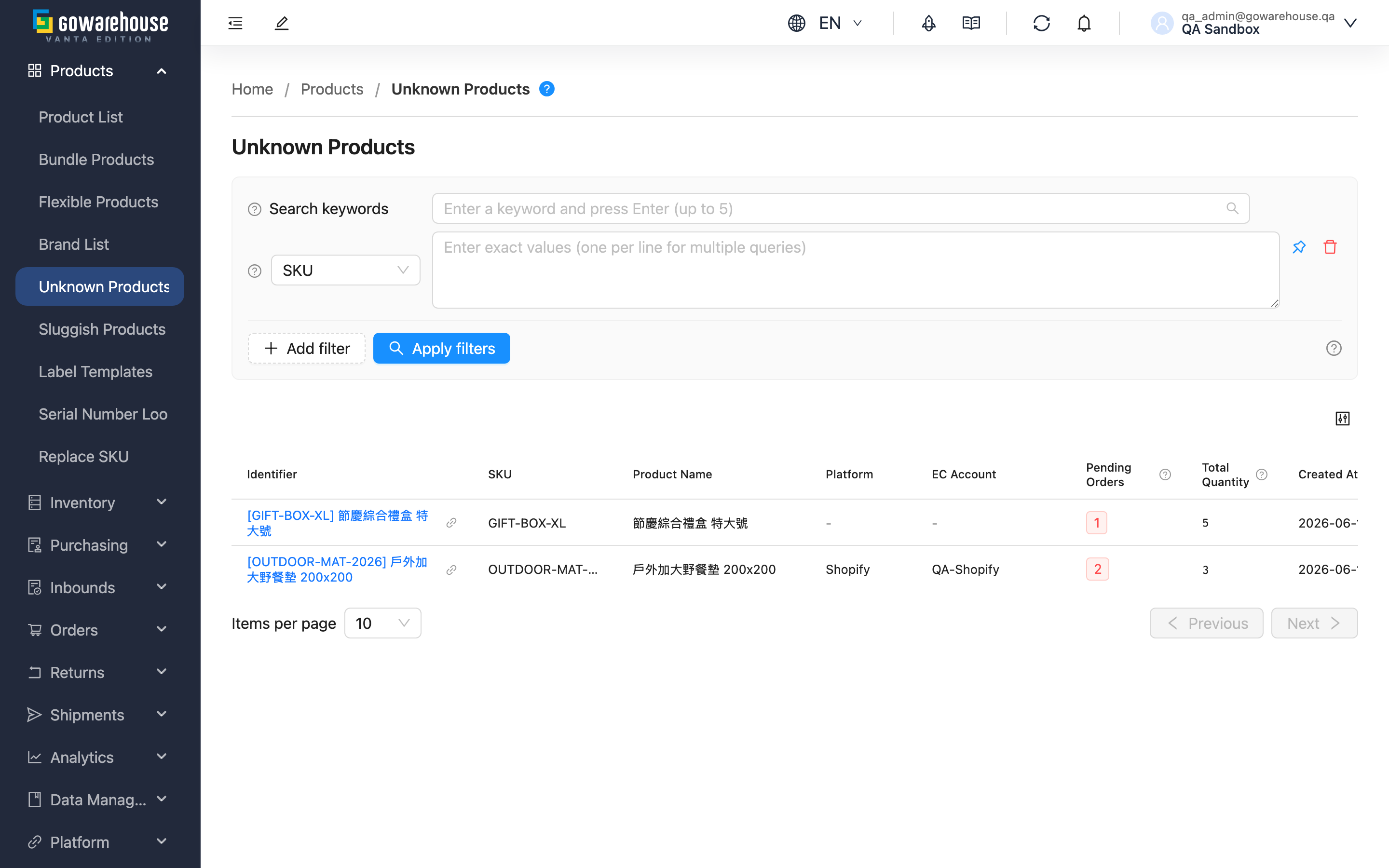
- Search box: Enter a keyword to match both SKU and Product Name (prefix match, from the start of the value).
- Filter options: Both SKU and Product Name support multiple values — one per line, so you can look up several SKUs or names at once.
2.2 List Columns
The same SKU appearing in different shops, or different products from different platforms, are listed as separate rows — so the "Platform" and "EC Account" columns help you tell sources apart.
| Column | Description |
|---|---|
| Identifier | Shown as "[SKU] Product Name"; click to open the detail page and map it |
| Platform | Which platform this record came from (e.g., Shopee); manually imported orders or orders with no source platform show "-" |
| EC Account | The source store account, used to tell apart the same SKU appearing in different shops; shows "-" when there is no source |
| Pending Orders | How many not-yet-shipped orders are blocked on this unknown product; highlighted red when above 0 |
| Total Quantity | The total quantity demanded for this unknown product across all orders |
The remaining columns (SKU, Product Name, Created At) display by name. Click the Identifier, SKU, Product Name, or Created At column header to sort.
2.3 Resolving Unknown Products
Mapping is done on the detail page: click the Identifier in the list to open the Unknown Product Detail, where you select the correct product and confirm the mapping. After mapping, the Unknown Product record is deleted and disappears from the list.
III. FAQ
Quick Links: FAQ | Important Notes
3.1 FAQ
▪ Why are unknown products created?
On import, the system matches the order's SKU against your system products; if there's no match and your merchant policy is "Auto Create", it creates an Unknown Product to accept the order. Common causes:
- The product is already selling on the platform, but its data hasn't been created in the warehouse yet
- The same product uses different SKUs or barcodes on different platforms
- The SKU was entered incorrectly, or the product was given a new SKU but the order carries the old one
▪ Do unknown products affect shipping?
Yes. As long as an order still contains an unmapped Unknown Product, the whole order cannot have inventory allocated and no fulfillment can be created — it stays in a waiting state until you map the Unknown Product to the correct product.
▪ Can the system reject orders with unknown products instead of creating records?
Yes. Each merchant has an "Unknown Product Policy" setting, defaulting to "Auto Create Product" (accept the order, map later). Switching it to "Reject Order" makes the import reject the whole order on an unmatched SKU, without creating an Unknown Product. "Reject Order" suits brands with a fixed catalog and strict SKU management. This setting is adjusted on the warehouse side in the merchant's profile.
▪ What's the difference between "Pending Orders" and "Total Quantity"?
"Pending Orders" is how many orders are blocked on this Unknown Product; "Total Quantity" is the total quantity those orders demand. For example, 3 orders each buying 2 units gives Pending Orders 3 and Total Quantity 6.
▪ Why do some records show "-" for "Platform" and "EC Account"?
That means the Unknown Product wasn't created from platform order syncing — for example a manually created or imported order, which never had a platform account. Records created from syncing platforms like Shopee show the source platform and shop.
▪ Can I map multiple unknown products in a batch?
Batch mapping isn't supported. Map them one at a time from each detail page, because choosing which system product each Unknown Product maps to requires your individual confirmation.
▪ Does the record disappear from the list automatically after mapping?
Yes. After a successful mapping the Unknown Product record is deleted, so it no longer appears when you refresh the list. It is also removed automatically when an order is edited or overwritten by an import and the Unknown Product is no longer used by any order; it stays as long as another order still uses it.
3.2 Important Notes
⚠️ Important Reminders
- Mapping cannot be undone; confirm the correct product on the detail page before running it.
- After a successful mapping the Unknown Product record is deleted and cannot be recovered.
💡 Tip: Prioritize Unknown Product with higher "Pending Orders" — one mapping unfreezes the most orders. If the same SKU keeps reappearing, check that the product master's SKU matches the platform.
IV. Related Features
| Feature | Description | Link |
|---|---|---|
| Unknown Product Detail | View a single unknown product and map it to a real product | Go |
| Product List | Manage system products; create them first before mapping | Go |
| Order List | View orders blocked by unknown products | Go |