
Brand Detail
Table of Contents
1. Feature Overview
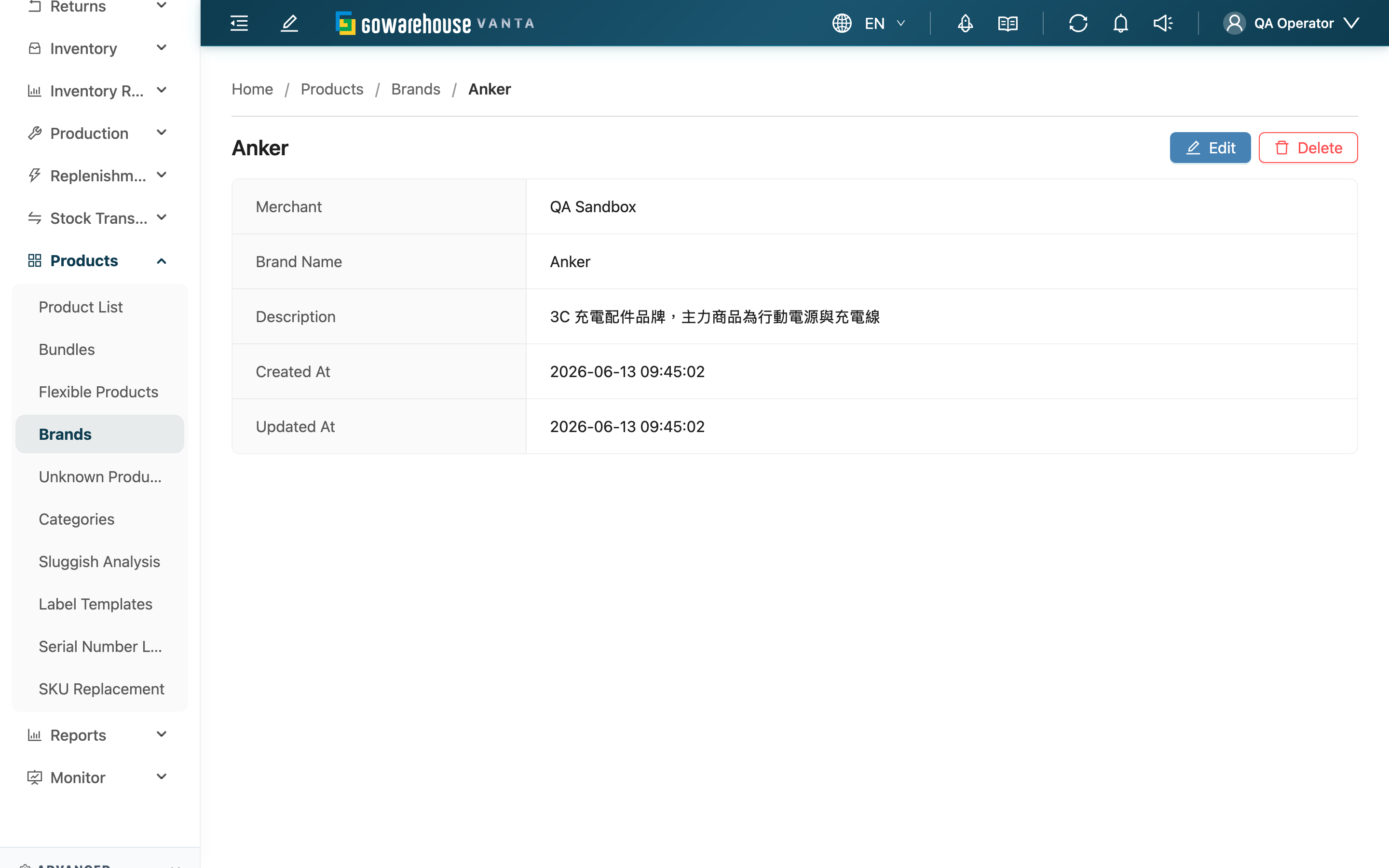
The brand detail page shows the complete data of a single brand and lets you edit or delete it right here. Enter it by clicking a brand name on the brand list. Editing is done in place — after clicking "Edit", the same page switches into a fillable form, and saving applies the changes.
Quick jump: Displayed Fields | Edit a Brand | Delete a Brand
1.1 Displayed Fields
| Field | Description |
|---|---|
| Merchant | The merchant this brand belongs to; shown only when serving multiple merchants |
| Brand Name | The brand name |
| Description | Additional notes for the brand; shows "-" when blank |
| Created At | When the brand was created |
| Updated At | When the brand was last updated |
1.2 Edit a Brand
Click "Edit" in the top right to enter edit mode, where you can modify the Brand Name and Description. The name is required and, after editing, still cannot duplicate another brand under the same merchant. Press save to apply, or cancel to discard the changes and return to the original content.
The owning merchant is not part of editing and cannot be changed to another merchant here.
1.3 Delete a Brand
Clicking "Delete" in the top right opens a confirmation dialog; after confirming, the brand is deleted. Deletion cannot be undone.
Deleting a brand does not delete products: products that were attached to this brand have their brand attribution removed (the brand field is cleared and they become products with no brand set), while the products themselves and their inventory are kept. To regroup these products, you must reassign a brand on each product.
2. FAQ
2.1 Questions
▪ What happens to products attached to a brand after I delete it?
The products are not deleted; only their brand attribution is removed — their brand field is cleared and they become products with no brand set, while the products and inventory are kept. To regroup them, reassign a brand on each product.
▪ Can a deleted brand be recovered?
No. Deletion cannot be undone. If you only want to stop using a brand but worry you may need it later, keep the brand and change the products' brand instead of deleting the brand directly.
▪ Can I change a brand to belong to another merchant?
No. The owning merchant is fixed after creation and is not editable. A wrong merchant can only be corrected by deleting and recreating.
▪ After I change the name, do products attached to this brand update automatically?
Yes. Products reference the same brand record, so after a brand is renamed, the brand name shown on every product attached to it updates together — no need to edit products one by one.
▪ It says the name already exists when I rename?
Brand names cannot be duplicated under the same merchant. Change it to a name not yet used under that merchant and save again.
2.2 Notices
⚠️ Important Notes
- Deleting a brand cannot be undone and removes the brand attribution from products using it. Before deleting, check whether any products still use it.
- The owning merchant cannot be changed after creation.
💡 Tip: When you only want to stop using a brand rather than remove it permanently, keep the brand and change the products' brand attribution instead, to avoid accidental deletion.
3. Related Features
| Feature | Description | Link |
|---|---|---|
| Brands | Go back to the brand list to browse and search all brands | Go |
| New Brand | Create a new brand | Go |
| Product List | View and adjust the brand attribution of products | Go |