
Fulfillments
Table of Contents
1. Use Cases
Quick links: Ship in-stock items first without holding up the whole order | Combine multiple orders to one parcel for the same receiver
Scenario 1: An out-of-stock item shouldn't hold up the whole order
Situation: A customer buys products A, B, and C at once, but C is temporarily out of stock. If the entire order has to wait for C to be restocked, A and B get stuck too, and the customer waits with nothing.
Use this feature: Orders aren't picked directly — the actual unit the warehouse works from is the "fulfillment". One order can be split into two fulfillments: one ships the in-stock A and B now, the other waits for C to arrive. Using the status filter here you can keep them apart: the one to ship first sits in "Allocated" ready to pick, while the out-of-stock one stays in "Out of Stock" waiting for restock. The split itself is done on the order detail page.
Result: The customer receives most of their items first, the missing part ships separately once restocked, and the whole order never gets frozen by one out-of-stock item.
Scenario 2: Combine multiple orders for the same receiver to save shipping
Situation: The same customer places several small orders in a row, all to the exact same address. Shipping them separately means several parcels, several shipping fees, and several deliveries for the customer.
Use this feature: Each order produces its own fulfillment, and fulfillments with matching conditions can be merged into one and shipped in a single parcel. You can first use the receiver name filter here to confirm which unshipped fulfillments belong to the same receiver, then go to Merge Fulfillments to combine them.
Result: Multiple orders ship in one parcel, saving duplicate shipping fees, and the customer only receives one delivery.
2. Features
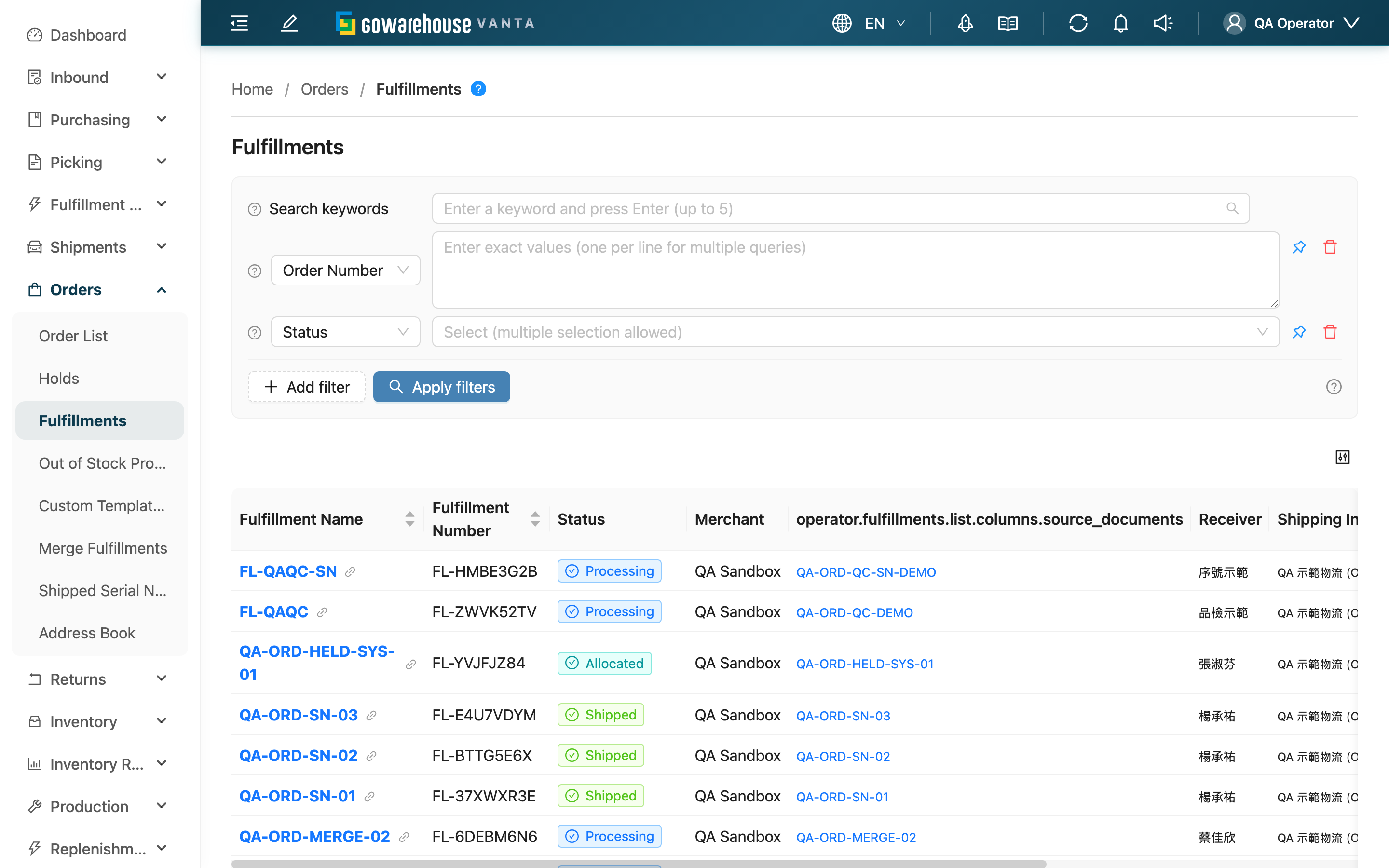
A fulfillment is the working unit the warehouse uses to actually ship. The order records "what the customer wants"; the fulfillment records "what the warehouse ships this time" — the system creates fulfillments automatically from orders, and warehouse staff allocate stock, pick, pack, and ship against the fulfillment. One order may be split into several fulfillments (ship in-stock items first), and several orders may be merged into one fulfillment (same-receiver consolidation). This list gathers every fulfillment so you can quickly find what to handle first and check each one's progress.
Jump to: Search & Filter | List Columns | Status Guide
💡 Tip: Click the question-mark icon next to the page title to open the illustrated "What is a fulfillment?" guide, which explains the relationship between orders and fulfillments as a short story.
2.1 Search & Filter
The search box at the top uses prefix matching: what you type is matched against the start of [Fulfillment Number / Fulfillment Name / Order Number / Receiver Name]. Press Enter, comma, or space to add multiple keywords (any match counts), up to 5.
Advanced filters list only the conditions that need explaining; for the rest, just type or select by name:
| Filter | How to use |
|---|---|
| Task Type | Fulfillments come from three sources; use this to pick out one type to batch-process: "Order Fulfillment", "Material Picking", "Stock Transfer" |
| Status | Filter by the fulfillment's current progress; multi-select. Commonly used to pull out "Allocated" (ready to pick) or "Out of Stock" (awaiting restock) fulfillments |
| Shipping Type | Filter by the shipping type the fulfillment actually uses; this filters on the fulfillment's own shipping type, so changes made on the detail page are reflected here immediately |
The remaining conditions (Order Number, Merchant, Receiver Name, Sales Channel, Created At) are entered or selected directly by name.
2.2 List Columns
| Column | Description |
|---|---|
| Fulfillment Name | Click to open the fulfillment detail page |
| Fulfillment Number | The system-generated fulfillment number, prefixed with FL |
| Status | Current progress, shown as a colored tag; see the Status Guide below |
| Source Documents | Where this fulfillment came from: a regular order shows the order number, material picking shows the work order, stock transfer shows the transfer order — click to open the source document |
| Receiver | The receiver name on the order |
| Shipping Info | The shipping type this fulfillment uses |
| Total Qty | Total item count to ship in this fulfillment; useful for estimating picking workload |
2.3 Status Guide
A fulfillment passes through the statuses below from creation to shipment. Understanding them tells you whether a fulfillment can be picked now or is stuck:
| Status | What it means | What's next |
|---|---|---|
| Pending | Just created, stock not yet allocated | Waiting for the system to allocate stock |
| Allocated | All stock reserved | Ready to start picking |
| Partial Allocated | Some items in stock and reserved, some out of stock | Wait for restock, or split off the in-stock items to ship first |
| Out of Stock | Not enough stock to allocate | Reallocate after restocking |
| Processing | Picking or packing has started | Ship after picking and packing |
| Shipped | Shipping completed | This is a final status |
| Canceled | The fulfillment has been canceled | Record kept for reference |
3. FAQ
3.1 FAQ
▪ How are fulfillments related to orders?
The order records "what the customer wants" (which products, where to ship, how much they paid); the fulfillment records "what the warehouse ships this time". The system creates fulfillments from orders automatically, and you work from the fulfillment day to day. Usually one order maps to one fulfillment, but when an item is out of stock one order splits into several fulfillments, and for the same receiver several orders may merge into one fulfillment. Keeping them separate means split-on-shortage and merge-to-save-shipping never alter the original order's contents.
▪ Why is the order status different from the fulfillment status?
The order status is aggregated from the statuses of all its fulfillments. For example, if one order is split into two fulfillments — one shipped, one still processing — the order shows partially shipped; only when both are shipped does the order become shipped. To know an order's real progress, look at the status of each fulfillment under it.
▪ The order is canceled — why is the fulfillment still here?
A fulfillment has its own lifecycle. When the order is canceled, its fulfillment moves to "Canceled", but the record is kept for reference and tracking instead of disappearing from the list.
▪ How do I handle an out-of-stock fulfillment?
Pick one depending on the situation: after restocking, use "Check Stock" on the order detail page to reallocate; or notify the merchant to adjust the order (reduce quantity or cancel); or use "Split Fulfillment" on the order detail page to ship the in-stock part first and leave the out-of-stock part for restock.
▪ How is "Total Qty" calculated?
It's the total item count this fulfillment needs to ship, including items from all its associated orders. After a merge, items from the merged-in orders are added in too. Use it to estimate picking time and workload.
▪ What's the difference between the three task-type sources?
- "Order Fulfillment": from a regular sales order; the most common type. Only this type can be split and merged.
- "Material Picking": material picking from a work order.
- "Stock Transfer": cross-warehouse shipment from a transfer order, bound one-to-one with the transfer order.
▪ Can I ship directly from this list?
This list is mainly for searching and tracking. Click the Fulfillment Name to enter the detail page where you can change the shipping type, split, and so on; do picking and shipment QC on their dedicated pages.
3.2 Notes
⚠️ Important
- Fulfillments are created automatically by the system from orders and cannot be added manually.
- Once a fulfillment enters "Processing" (picking has started), its order can no longer be edited, to keep records consistent with physical stock.
- Handle out-of-stock fulfillments promptly, otherwise the order stays stuck as unshipped for a long time.
💡 Tip: To prioritize, first filter "Status" to "Allocated" (stock ready), then sort by "Created At" oldest-first — that's first-in-first-out order.
4. Related Features
| Feature | Description | Link |
|---|---|---|
| Merge Fulfillments | Combine multiple fulfillments for the same receiver into one parcel | Go |
| Order List | View orders; the entry point for splitting fulfillments and checking stock | Go |
| Shipment QC | Scan-verify and pack fulfillments for shipment | Go |
| Generate Picking List | Turn fulfillments waiting to ship into picking tasks | Go |