
Warehouses
Table of Contents
1. Use Cases
Quick links: Pick the right storage mode | Running multiple warehouses | Fill in address and timezone
Case 1: Pick the right storage mode
Situation: Your company just leased a new physical warehouse and is about to start receiving goods. Some say locations should be numbered and managed; others say just put things anywhere since there isn't much stock. How you set this up directly affects the daily inbound and picking flow.
Use this feature: When you add a warehouse, pick a Storage Mode — Dynamic Mode (full locations, many-to-many product-location), Dedicated Mode (each product has a dedicated location, inbound auto put-away), or Virtual Mode (no locations, everything goes into a single virtual general location). The differences and when to use each are in Storage Modes.
Result: The mode you choose determines all of this warehouse's location, put-away, and picking behavior afterward — think it through before creating.
Case 2: Running multiple warehouses under one organization
Situation: Business has grown — a main warehouse in the north and a new transit warehouse in the south. Inventory, inbound, and picking on both sides must be counted separately and cannot be mixed.
Use this feature: Add a second warehouse in warehouse management. Each warehouse has its own zones, locations, and inventory. Operators lock onto the warehouse they currently work at, while the list page shows every warehouse under the organization; the link icon opens a warehouse's detail in a new tab.
Result: Each warehouse keeps clean, independent records. Operators only work within their own warehouse, while managers can survey every warehouse in the organization from this list.
Case 3: Filling in the warehouse address and timezone
Situation: To integrate with logistics and print shipping labels, the carrier needs the correct warehouse pickup address; and when warehouses operate across countries, each one's business hours must be read in its local timezone.
Use this feature: Open the warehouse's detail, edit it, and fill in the full address (country, city, district, postal code, address) and the Timezone it sits in. For Taiwan, pick the city and district from dropdowns and the system auto-fills the matching postal code.
Result: Once address and timezone are complete, subsequent shipping and report times follow this warehouse's settings.
2. Features
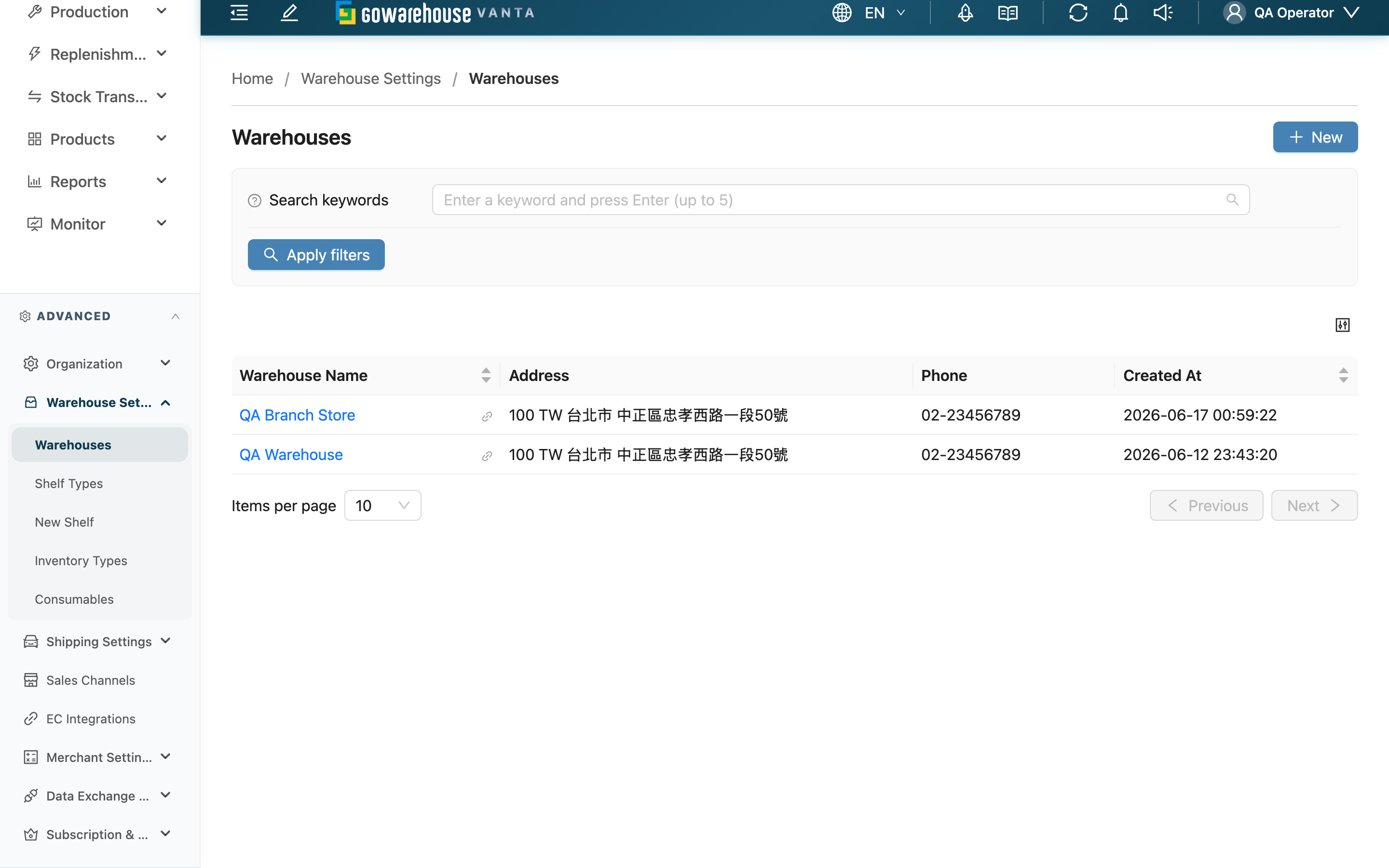
Warehouse management is where you configure the basic profile of every warehouse. A warehouse determines which inventory, inbound, and picking belong where, and the Storage Mode chosen when each warehouse is created further determines how that warehouse manages its locations. This list page shows every warehouse under your organization, where you can add warehouses, search existing ones, or open any warehouse to view and edit its detailed settings and zones.
Quick jump: Search | List Columns | Storage Modes | Warehouse Zones | Add and Edit
2.1 Search
The search box at the top finds warehouses by Warehouse Name, Address, or Phone keyword — partial text matches. Warehouse counts are usually small, so search mainly helps locate one quickly when the organization has many warehouses.
2.2 List Columns
| Column | Description |
|---|---|
| Warehouse Name | Click the name to open the warehouse detail; the link icon to its right opens the detail in a new tab |
| Address | Shows the combined full address; displays "-" when not filled in |
| Phone | Warehouse contact phone |
| Created At | The date and time this warehouse was created |
2.3 Storage Modes
Every warehouse must pick a Storage Mode when created — it determines how the warehouse manages locations:
| Mode | Description |
|---|---|
| Dynamic Mode | Full location management, supporting many-to-many product-location relationships, dynamically allocated, suitable for large warehouses. |
| Dedicated Mode | Each product has a dedicated location. Inbound items are automatically put to default shelf, and picking prioritizes default shelf. |
| Virtual Mode | No location management, all inventory automatically goes to a virtual general location. |
Once this warehouse starts operating, the storage mode is locked and can no longer be changed (see FAQ). Only a Dynamic Mode warehouse needs to set Allow Mixed Inventory Types; a Virtual Mode warehouse needs no shelf location template or location list.
2.4 Warehouse Zones
On the warehouse detail page, the "Warehouse Zones" section lets you divide the warehouse into zones (e.g. cold storage, Building A, returns staging) to group locations for easier management. The operations and restrictions for adding, editing, and deleting zones are covered in the detail doc.
2.5 Add and Edit
Click New at the top right to open add warehouse; open any warehouse's detail to edit its data inline by switching to edit mode. You can only edit a warehouse when it is the one you are currently working at — this restriction is covered in the FAQ.
3. FAQ
3.1 Questions
▪ Can the storage mode be changed after creation?
Only while this warehouse has not started operating. Once any real warehouse activity occurs — an inbound, receiving, picking list, stock take, stock adjustment, shelf movement, inventory transformation, or once it holds actual inventory or non-system-reserved locations have been created — the warehouse is considered operating, the storage mode is permanently locked, and cannot be changed. To switch modes, you must create a new warehouse instead.
▪ Why is the storage mode designed to be unchangeable?
The storage mode determines the entire warehouse's location structure and put-away/picking rules. Once the warehouse holds inventory and activity records, changing the mode midway would leave existing inventory's locations out of sync with the new rules, causing record-versus-reality mismatches. The system therefore makes it one-way — adjustable before operations begin, locked afterward — to keep inventory records consistent.
▪ Why can't I see the "Edit" button?
A warehouse can only be edited by the operator currently working at that warehouse. If the warehouse you are currently working at is not this one, the detail page won't show the edit button. Switch your current working warehouse to this one, then come back to edit. Editing also requires the warehouse settings edit permission; if you still can't see it, contact your administrator to confirm your permissions.
▪ Changing the storage mode shows "Storage mode cannot be changed once the warehouse has started operations."?
It means real activity occurred at this warehouse between when you opened the edit form and when you submitted (e.g. another tab or a colleague just created an inbound). The mode is now locked, so the system blocks the change and reloads the latest state — you'll see the mode field become locked and no longer selectable.
▪ What is "Allow Mixed Inventory Types" for?
It controls whether the same location can hold different inventory states of the same product (e.g. good stock and defective stock together). This switch only needs to be set for a Dynamic Mode warehouse; Virtual Mode and Dedicated Mode warehouses always allow mixing, so the switch does not appear.
▪ Do I have to fill in the postal code for a Taiwan warehouse?
No. When the country is Taiwan (or left blank), City and District switch to dropdowns; after selecting them the system auto-fills the matching Postal Code, which is then filled in automatically and cannot be edited manually.
▪ Why doesn't a virtual-mode warehouse show the shelf location template?
A Virtual Mode warehouse has no location list — all inventory automatically goes into a single virtual general location — so it does not need and will not show the Default Shelf Location Template setting.
3.2 Notices
⚠️ Important
- The storage mode is permanently locked and cannot be reverted once this warehouse starts operating — confirm you picked the right mode before creating.
- A warehouse can only be edited by the operator currently working at it; you cannot directly modify another warehouse's data from across warehouses.
💡 Tip: When running multiple warehouses, plan each warehouse's mode and role (main, transit, returns) in this list first, then create them — it's far less work than rebuilding because you want to switch modes later.
4. Related Features
| Feature | Description | Link |
|---|---|---|
| Warehouses (Detail) | View and edit a single warehouse and manage its zones | Go |
| Shelf List | Manage the actual locations under a warehouse | Go |
| Inventory List | View inventory quantities and states per warehouse | Go |